
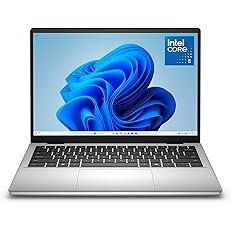
Dell 14 Plus (DB14250) Review: Is It Worth Your Money in 2026?
The Dell 14 Plus (DB14250) has emerged as one of the most talked-about laptops in the mid-range segment. Designed for professionals, students, and casual users, this device promises a balance of performance, portability, and style. In this detailed review, we will examine every aspect of this laptop, from design to performance, to help you decide if it’s the right choice. Design and Build Quality The first thing you notice about the Dell 14 Plus (DB14250) is its sleek and minimalist design. The aluminum chassis gives it a premium feel while maintaining lightweight portability. Weighing just under 3.5 pounds, this laptop is perfect for students or professionals who travel frequently. The hinge mechanism feels sturdy, allowing the display to stay firm at any angle. Dell has also opted for a clean layout with narrow bezels, making the screen feel larger than its 14-inch size. The overall build quality ensures durability without adding unnecessary bulk. Display and Visual Experience The Dell 14 Plus (DB14250) features a 14-inch Full HD display with an anti-glare coating. Colors appear vibrant, and the brightness is sufficient for indoor and outdoor usage. While it does not match the premium OLED panels found in high-end laptops, it performs admirably in both productivity and media consumption. The screen also supports wide viewing angles, which means you can watch videos or present slides to multiple people without any color distortion. For a laptop in this price segment, the Dell 14 Plus display offers a clear and crisp visual experience suitable for work, study, and entertainment. Performance and Specifications Performance is where the Dell 14 Plus (DB14250) truly shines. It comes equipped with the latest Intel Core i5 or i7 processors, ensuring smooth multitasking and fast app execution. Coupled with 8GB or 16GB of RAM, the laptop handles multiple browser tabs, office applications, and light photo editing without lag. Storage options include fast SSD drives ranging from 256GB to 1TB. Boot times are impressively quick, and software launches almost instantly. For users seeking a reliable laptop for daily tasks, the Dell 14 Plus (DB14250) delivers a responsive and efficient performance. Graphics and Gaming Performance While the Dell 14 Plus (DB14250) is not primarily marketed as a gaming laptop, it performs reasonably well with casual gaming and creative work. Integrated Intel Iris Xe graphics handle tasks like video playback, photo editing, and streaming with ease. For users interested in light gaming or graphic design, the laptop manages older titles and less-demanding games smoothly. However, for AAA gaming or professional 3D rendering, you may want to consider a device with dedicated graphics. The Dell 14 Plus offers a balanced solution for everyday multimedia needs. Keyboard and Trackpad Experience Typing on the Dell 14 Plus (DB14250) is comfortable and responsive. The keyboard provides good key travel, and the layout feels natural for long typing sessions. Dell has included a backlit option, which is particularly useful for working in low-light environments. The trackpad is spacious and precise, supporting multi-touch gestures effortlessly. Scrolling, zooming, and swiping feel smooth, and the overall input experience is satisfying for both casual users and professionals. Connectivity and Ports Dell has not compromised on connectivity options for the 14 Plus (DB14250). It comes with multiple USB-A and USB-C ports, an HDMI port, and a headphone jack. There’s also a microSD card reader for expanding storage or transferring files from cameras and other devices. Wi-Fi 6 support ensures faster and more reliable wireless connections, while Bluetooth 5.2 allows seamless pairing with peripherals. The laptop’s connectivity options make it versatile for both work-from-home setups and travel needs. Audio and Multimedia Audio quality on the Dell 14 Plus (DB14250) is impressive for its size. The stereo speakers deliver clear vocals and decent bass, making it suitable for video calls, streaming music, or watching movies. While it may not replace dedicated external speakers, it performs adequately for personal and professional use. The laptop also supports high-definition video playback without stutter. Combined with the 14-inch Full HD display, the Dell 14 Plus offers a complete multimedia experience for entertainment and productivity. Battery Life and Portability One of the standout features of the Dell 14 Plus (DB14250) is its battery life. The laptop can last up to 9-10 hours on a single charge under normal usage, which is ideal for students, remote workers, or travelers. Charging is relatively fast, allowing you to top up the battery in just over an hour. Coupled with its lightweight design and compact dimensions, this laptop is a reliable companion for long commutes, coffee shop work, or travel adventures. Software and User Experience The Dell 14 Plus (DB14250) ships with Windows 11 Home, providing a smooth and modern user interface. It comes preloaded with essential apps and utilities to optimize performance, but users can easily customize the system according to their needs. Dell’s support software, including firmware updates and troubleshooting tools, ensures the laptop remains stable and secure. For beginners and experienced users alike, the Dell 14 Plus offers a seamless and user-friendly experience. Pros and Cons While reviewing the Dell 14 Plus (DB14250), several strengths and limitations become evident. Its design, portability, display, and battery life are significant advantages. The performance is sufficient for most users, and the connectivity options are versatile. However, it lacks a dedicated GPU, which limits its suitability for heavy gaming or professional video editing. The speakers, while good, are not top-tier, and higher RAM configurations can be expensive. Overall, the pros outweigh the cons for most users seeking a balanced and capable laptop. Final Verdict: Is the Dell 14 Plus (DB14250) Worth Buying? After testing the Dell 14 Plus (DB14250) extensively, it is clear that this laptop is a reliable choice for mid-range buyers. It excels in portability, battery life, and general performance while offering a solid multimedia experience. For students, professionals, and casual users, the Dell 14 Plus (DB14250) provides excellent value for money. If you prioritize a lightweight, durable laptop with solid performance and a good display, this laptop is worth considering in […]
Dell 14 Plus (DB14250) Review: Is It Worth Your Money in 2026? Read Post »