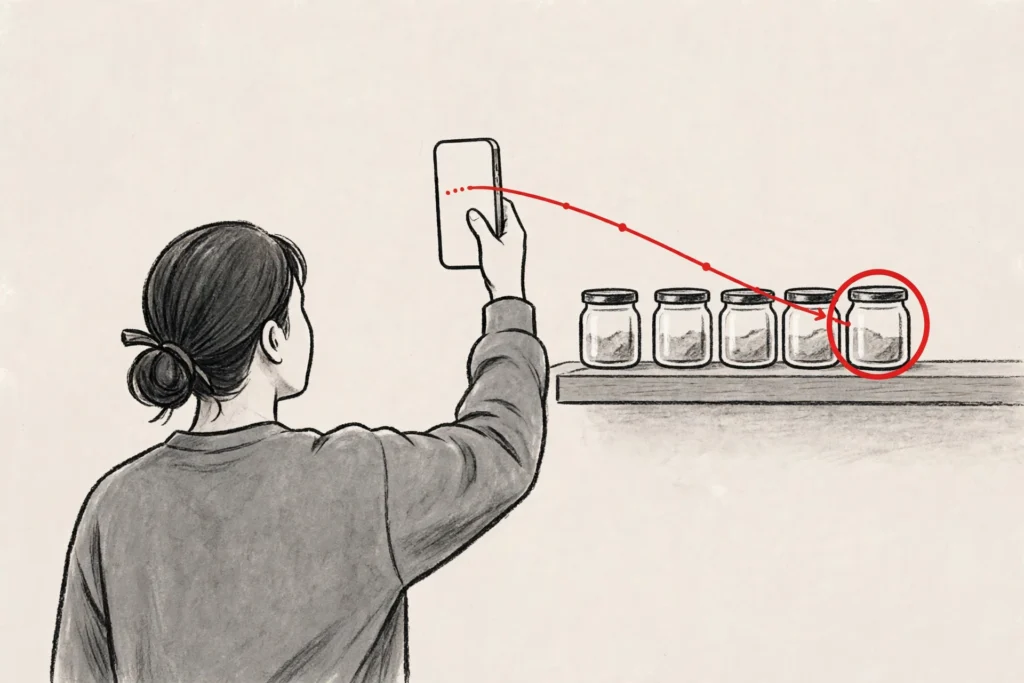
Picture a kitchen shelf lined with small jars. You know the oregano is up there somewhere, but you cannot see the labels. You lift your phone, point the camera at the shelf, and Gemini Live Guided Vision answers in a calm voice: second shelf from the top, fourth from the left.
You move your hand up, and the voice guides you closer until it says the words you have been waiting for: perfect, your hand is right above it.
That is the everyday moment Google is aiming at. Gemini Live Guided Vision is now available on iPhone, Google announced on November 25, bringing its camera-based visual assistant to iOS for the first time. The feature turns a phone camera into a talking guide, describing what it sees and answering questions about it in real time.
Until now, Guided Vision was an Android-only feature. It first launched on Android in October, and Google says it was developed with input from blind and low-vision communities around the world. Now iPhone owners can open Gemini Live, point their camera at something, and get spoken descriptions and on-screen guidance as they go.
What Gemini Live Guided Vision Does on iPhone
Guided Vision sits inside Gemini Live, Google’s conversational mode for its Gemini assistant. Instead of typing a question, you show the camera what is in front of you. Gemini looks at the live view, describes it out loud, and keeps talking as you move the phone or your hand.
The difference from a simple photo description is the back-and-forth. You can ask follow-up questions, and Gemini responds in the moment.
If an object is partly out of frame, it can suggest moving the camera. If you are searching for something specific, it can direct your hand step by step, shelf by shelf, until you find it.
Google’s own examples are deliberately ordinary: reading the small print on a food packet, working out a washing machine cycle, or finding a dropped earbud. None of these are dramatic, and that is the point. They are the small frictions that add up across a day.
The announcement itself was brief. Google shared the news through its official Gemini app account on X, with a short post: Guided Vision in Gemini Live is now available on iOS, open Live, point your camera, and get real-time guidance right on screen. There was no blog post and no detailed help page for iPhone users yet.
How to Use Guided Vision on Your iPhone
Getting started is simple, at least in theory. Open the Gemini app on your iPhone and start a Gemini Live session. Then share your camera and point it at whatever you want to know about. Gemini describes what it sees and answers your questions as you talk.
Google has not yet published official iPhone setup steps. Its help page still describes only the Android version, which works on devices running Android 9 or later wherever Gemini Live is available. A dedicated iPhone help page is expected to follow in the coming days.
One early report offers a possible shortcut. Japanese publication Jetstream says Guided Vision can be switched on from the Voice section of the Gemini app’s settings.
That route has not been confirmed by Google, so treat it as a tip worth trying rather than an official instruction.
Availability is also still unclear. Google has not said which iPhone models the feature needs, which countries are getting it first, or whether a paid Gemini plan is required. The rollout appears to be gradual, so the feature may not show up for every iPhone user on day one.
Built With the Blind and Low-Vision Community
Guided Vision was not designed in a vacuum. Google says it built the feature alongside blind and low-vision communities in India, Brazil, Singapore, Indonesia, Japan, and other countries.
That matters, because the hardest part of a tool like this is not the vision model. It is knowing what to say, when to say it, and how much detail is actually helpful.
A camera assistant that talks too much is a nuisance. One that talks too little leaves you guessing.
The guidance has to be spatial and concrete: not just “there is a jar”, but where it is, relative to your hand, in words you can act on. That is the kind of detail you only get right by testing with the people who will rely on it every day.
The same Gemini app update also added more than 60 expressive voices with local accents, from the United States, the United Kingdom, India, Indonesia, Korea, and Brazil. A voice assistant that sounds like it belongs to your world is easier to trust and to listen to for long stretches.
Google’s Gemini privacy changes earlier this month showed how quickly trust can become the story around an AI assistant. A feature that looks through your camera needs that trust even more. Users are, in effect, letting an AI watch their home, their kitchen, and their daily life in real time.
What Guided Vision Cannot Do
For all its promise, Google is careful about the limits. Guided Vision can make mistakes. It can misread a label, confuse two similar objects, or miss something entirely.
Like any AI tool, it is confident even when it is wrong, so users need to stay alert to errors.
Google is explicit that Guided Vision is not a medical device or a mobility aid. It is not a replacement for a white cane, and it should not be used for navigation, safe travel guidance, or obstacle detection.
Those are jobs for tools built and tested for safety, not for a general-purpose chatbot with a camera.
That boundary is important. A feature that helps you find a spice jar is genuinely useful. A feature that someone leans on to cross a road is a different matter entirely.
Google’s wording draws that line clearly, and users should respect it.
There is also the question of privacy. Pointing a camera at your surroundings means sharing live images of your home with Google’s servers. Google has not yet detailed how that video is handled on iPhone, or how long it is kept.
Guided Vision Is Heading to Smart Glasses Too
The iPhone launch is only one stop on a longer road. Google’s new Gemini-powered smart glasses, which go on sale on December 10, will also support Guided Vision.
On glasses, the idea becomes even more natural: no phone to hold, no camera to aim, just a quiet voice in your ear describing the world as you look at it.
That is where the feature starts to look less like a phone trick and more like a platform. The same assistant that helps you find a jar today could one day describe a street scene, read a menu, or guide you through an unfamiliar building.
The glasses make the camera hands-free, which is exactly what a visual assistant needs to be truly useful.
For now, though, the phone is the test bed. Google’s November Pixel Drop brought Gemini deeper into Pixel phones, and Guided Vision is part of the same pattern: AI that sees the world through your camera and talks you through it.
The iPhone rollout simply extends that pattern to the other half of the smartphone world.
What Happens Next for iPhone Users
The immediate question is when the feature actually appears on your phone. Google has a habit of rolling features out gradually, and Guided Vision on iPhone looks no different. If it is not there yet, updating the Gemini app and checking back over the next few days is the best move.
The longer question is how fast Google fills in the missing details: an iPhone help page, supported models and countries, and clarity on subscriptions. Accessibility features live or die on trust, and trust comes from specifics, not slogans.
Apple is moving in a similar direction. The iOS 27.3 beta suggests Siri AI could soon read health data and help with everyday tasks. The competition between the two companies may be the best news of all for users, since it pushes both to ship faster.
For blind and low-vision iPhone users, the wait is at least partly over. Guided Vision is here, it talks, and it can already find the oregano. The rest — the details, the polish, the wider rollout — is still to come.
But the moment when an iPhone camera became a pair of talking eyes is already worth noting. According to Gadgets 360, Google announced the iOS rollout on November 25, and the feature is reaching users now.